Widgets
Sidebar widgets are editable from Decap CMS. They live in src/data/widgets.json.

Where to Edit
In the CMS:
- Click Site Settings
- Click Sidebar Widgets
What You Can Edit
| Widget | Purpose |
|---|---|
| Blog List | Blog list page header |
| Blog Page | "Back to Journal" link |
| About | About widget on blog sidebar |
| Newsletter | Newsletter signup (disabled) |
| Links | External links (disabled) |
Blog List
Header for the blog list page.
| Field | Purpose |
|---|---|
| Badge | Small label above title |
| Title | Main heading (HTML allowed) |
| Subtitle | Description |
| Read Label | Text for "read" links |
Example:
Badge: ● JOURNAL — LATEST UPDATES
Title: Notes on documentation,<br />design & <i>craft.</i>
Subtitle: Product updates, behind the scenes, and how we built Nocturne.
Read Label: READ →
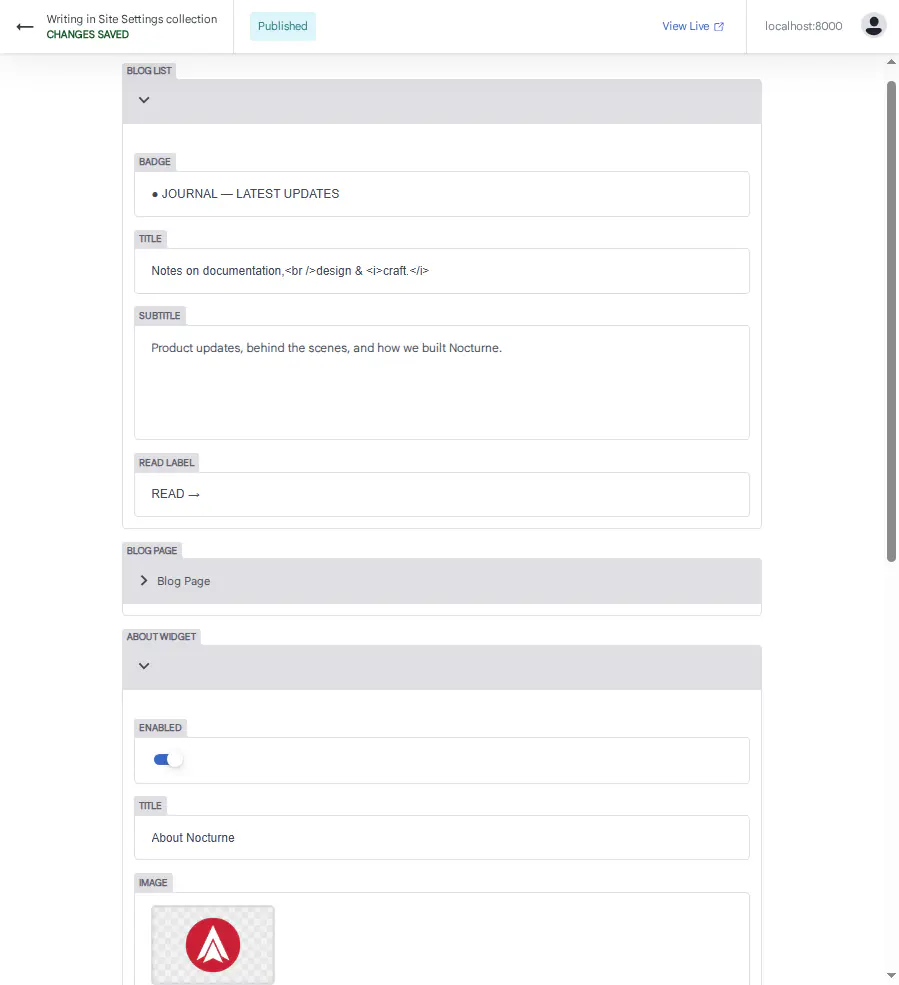
Blog Page
"Back to Journal" link on individual posts.
| Field | Purpose |
|---|---|
| Text | Link text |
| URL | Link destination |
Example:
Text: ← BACK TO JOURNAL
URL: /blog/
About Widget
Widget shown in the blog sidebar.
| Field | Purpose |
|---|---|
| Enabled | Show or hide this widget |
| Title | Widget heading |
| Image | Widget image |
| Text | Widget description |
| Link | Where the widget links to |
| Link Label | Link text |
Example:
Enabled: true
Title: About Nocturne
Image: /img/axcoranewlogored.webp
Text: Nocturne is a premium Docusaurus documentation system by Axcora Technology.
Link: /docs/intro
Link Label: About Nocturne →
To disable: set Enabled to false.
Newsletter Widget
Newsletter signup form. Disabled by default.
| Field | Purpose |
|---|---|
| Enabled | Show or hide this widget |
To enable: set Enabled to true. You'll need to add a newsletter provider integration — see Customization → Components.
Links Widget
External links list. Disabled by default.
| Field | Purpose |
|---|---|
| Enabled | Show or hide this widget |
To enable: set Enabled to true. The links are configured in src/data/widgets.json — you'll need to add them manually.
After Editing
- Click Save
- The widget updates instantly
- Refresh if needed
Troubleshooting
Widget doesn't appear
- Check that Enabled is set to true
- Check that the widget is used in a component
- Check the terminal for errors
About widget image doesn't load
- Check that the file exists in
static/img/ - Check that the path starts with
/img/
Newsletter widget is empty
The newsletter widget requires a provider integration. See Customization → Components for details.
What's Next?
Now let's edit documentation pages.